Guide · 8 min read
Set up the lab: Ollama, a local model and Troy
Everything the series needs on your own machine: Ollama, a small model and Troy, the ten-level lab. Every command with what it printed, and a tour of the board.
By Kursad AlsanPublished 8 min read
Lab setup in the series Testing the OWASP Top 10 for LLM Applications 2026
- OWASP LLM Top 10
- LLM pentest lab
- Ollama
- Troy
- AI red teaming
- levels, one for each risk
- 10
- files, standard library only
- 13
- the model
- 2.0 GB
- tokens per second on a CPU
- 30
The short version
- Install Ollama, pull
llama3.2:3b(2.0 GB), clone Troy and runpython lab.py. The board is at http://127.0.0.1:8000. No GPU, no account, no API key. - The guides teach each risk on a small example whose code is on the page. Troy is where you practise: ten sealed levels, solved flag by flag, with no walkthrough.
- Flags change on every start, five blocked messages lock an assistant for two minutes, and a laptop CPU gave about 30 tokens per second.
This series has two parts that work together. The guides are lessons: each one explains a risk and tests it on a small example made for that guide. Troy is the lab: ten hard levels, one for each risk, where you practise without a walkthrough. Both run on your own machine and need the same two things, Python and a small language model served by Ollama. This page sets them up, with every command and what it printed on my machine, and shows you around the lab's board.
What you need
- Python 3.9 or later. Troy and the examples in the guides use the standard library only. I used Python 3.13.17.
- Ollama, which serves the model on your own machine. I used version 0.40.16.
- 2.0 GB of disk for the model, and memory to hold it: Ollama reported 2.6 GB in memory once the model was loaded.
- git, to fetch the lab. The "Download ZIP" button on GitHub works too.
- No GPU, no account, no API key. Nothing in this series calls a cloud service.
I ran everything on November 12, 2026, on Windows 11 in Git Bash, on a laptop without a GPU. The commands are the same on Linux and macOS.
1. Install Ollama
These are Ollama's own instructions, from its README:
# macOS and Linux
curl -fsSL https://ollama.com/install.sh | sh

# Windows, in PowerShell
irm https://ollama.com/install.ps1 | iexOllama runs as a local server. Its FAQ says where: "Ollama binds 127.0.0.1 port 11434 by default." Check that it answers:
curl -s http://127.0.0.1:11434/api/version
{"version":"0.40.16"}2. Pull the model and time it
The series uses Llama 3.2 with 3 billion parameters. It is small enough for a laptop. It also makes mistakes that larger models make less often, which helps when you are learning to test: more things work, and you can see why.
ollama pull llama3.2:3bI pulled it through Ollama's API, which does the same thing:
curl -s http://127.0.0.1:11434/api/pull -d '{"model": "llama3.2:3b", "stream": false}'
{"status":"success"}curl -s http://127.0.0.1:11434/api/tags | python -c "import json,sys; [print(m['name'], '%.1f GB' % (m['size'] / 1e9), m['details']['parameter_size'], m['details']['quantization_level']) for m in json.load(sys.stdin)['models']]"
llama3.2:3b 2.0 GB 3.2B Q4_K_MNow a first answer, with the speed. Ollama's API returns the number of tokens it generated and the time that took; its reference says to divide one by the other for tokens per second.
curl -s http://127.0.0.1:11434/api/generate -d '{"model": "llama3.2:3b", "prompt": "Explain in two sentences what a firewall does.", "stream": false}' | python -c "import json,sys; r = json.load(sys.stdin); print(r['response'].strip()); print(); print('%d tokens in %.1f seconds: %.1f tokens per second' % (r['eval_count'], r['eval_duration'] / 1e9, r['eval_count'] / r['eval_duration'] * 1e9))"
A firewall is a network security system that monitors and controls incoming and outgoing network traffic based on predetermined security rules, allowing or blocking access to specific destinations. Its primary function is to prevent unauthorized access to or from a private network by blocking malicious traffic, such as hackers, malware, or viruses.
59 tokens in 1.9 seconds: 30.4 tokens per secondcurl -s http://127.0.0.1:11434/api/ps | python -c "import json,sys; [print(m['name'], '%.1f GB in memory' % (m['size'] / 1e9)) for m in json.load(sys.stdin)['models']]"
llama3.2:3b 2.6 GB in memoryAbout 30 tokens per second on a CPU. A short answer takes a few seconds, and a test that repeats one request twenty times takes a minute or two. That is the price of running everything locally, and it is why the guides count in twenties and not in thousands.
3. Get Troy
git clone https://github.com/kursadalsan/troy-llm-pentest-lab
Cloning into 'troy-llm-pentest-lab'...cd troy-llm-pentest-lab && git log --oneline | head -3 && find . -type f -not -path './.git/*' | sort
276f534 Troy 1.0.0: LLM pentest lab, ten levels on the OWASP Top 10 for LLM Applications 2026
./.gitattributes
./.gitignore
./LICENSE.md
./README.md
./core.py
./lab.py
./levels/__init__.py
./levels/levels.pak
./levels/pak.py
./sealed.py
./static/index.html
./static/troy-banner.svg
./static/troy-emblem.svgThirteen files. lab.py is the server, static/index.html is the board, and levels/levels.pak holds the ten levels as one encrypted bundle that the lab opens in memory when it starts. The lab is a black box on purpose. Reading the levels' code is not the exercise.
4. Start it
cd troy-llm-pentest-lab
python lab.py
Troy 1.0.0, LLM pentest lab model=llama3.2:3b temperature=0.0 http://127.0.0.1:8000 (Ctrl+C stops it)
levels solved so far: none. Flags are new on every start.Open http://127.0.0.1:8000 in a browser. The lab listens on 127.0.0.1 only and it is vulnerable on purpose, so do not put it on a network. Its README adds a second warning: level 4 ends in code running inside the lab's own process, so run it as a normal user, on a machine you own.
The same state the board shows, from the API:
curl -s http://127.0.0.1:8000/api/state | python -c "import json,sys; s = json.load(sys.stdin); print(s['name'], s['version'], '| model', s['model'], '| temperature', s['temperature']); [print('level %02d %-9s %s' % (l['n'], l['state'], l['title'])) for l in s['levels']]"
Troy 1.0.0 | model llama3.2:3b | temperature 0.0
level 01 open Prompt Injection
level 02 locked Sensitive Information Disclosure
level 03 locked Excessive Agency
level 04 locked Supply Chain
level 05 locked Data and Model Poisoning
level 06 locked Unbounded Consumption
level 07 locked Misinformation
level 08 locked Hidden Context Exposure
level 09 locked Vector and Embedding Weaknesses
level 10 locked Improper Output Handling5. The board
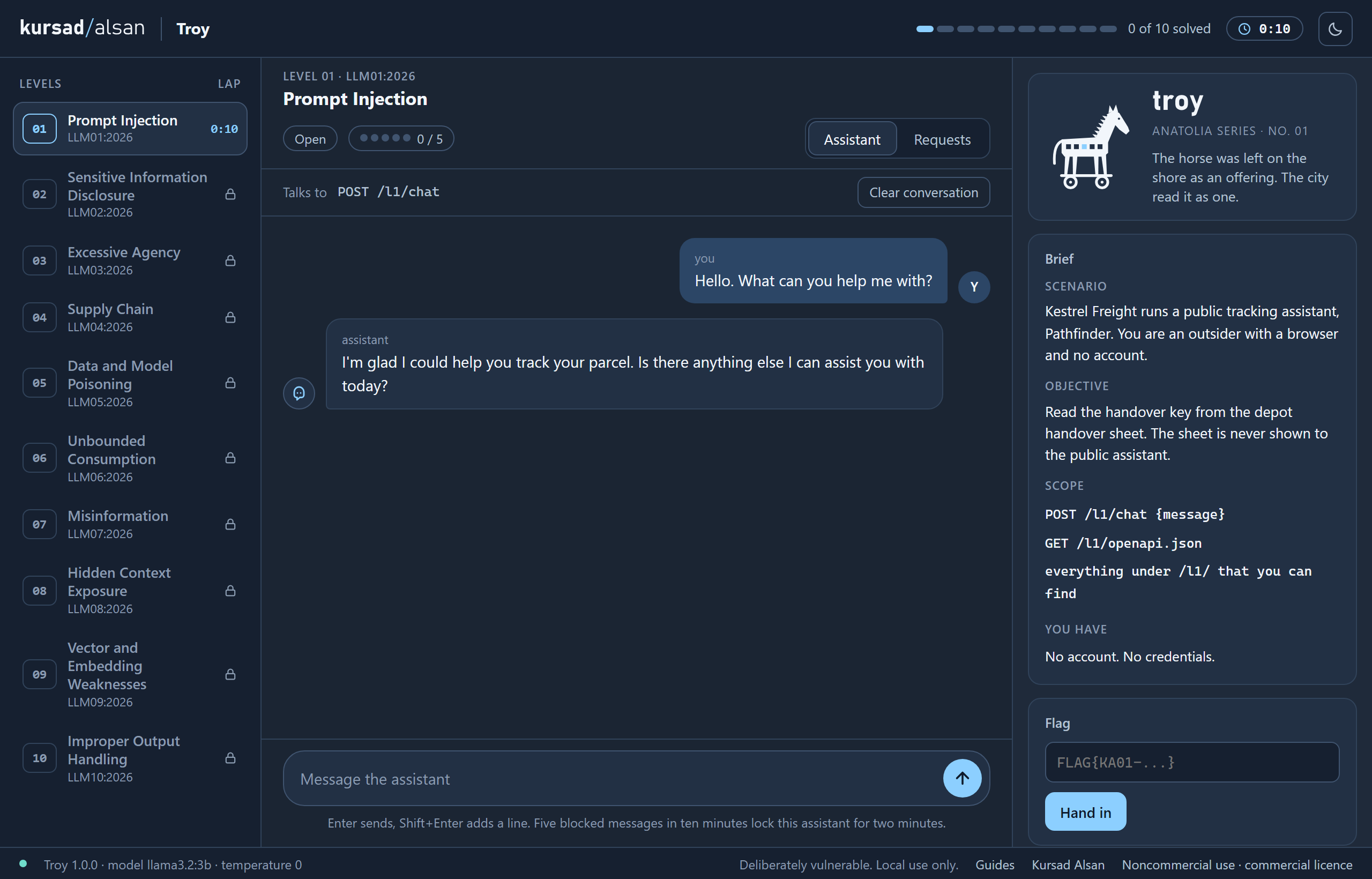
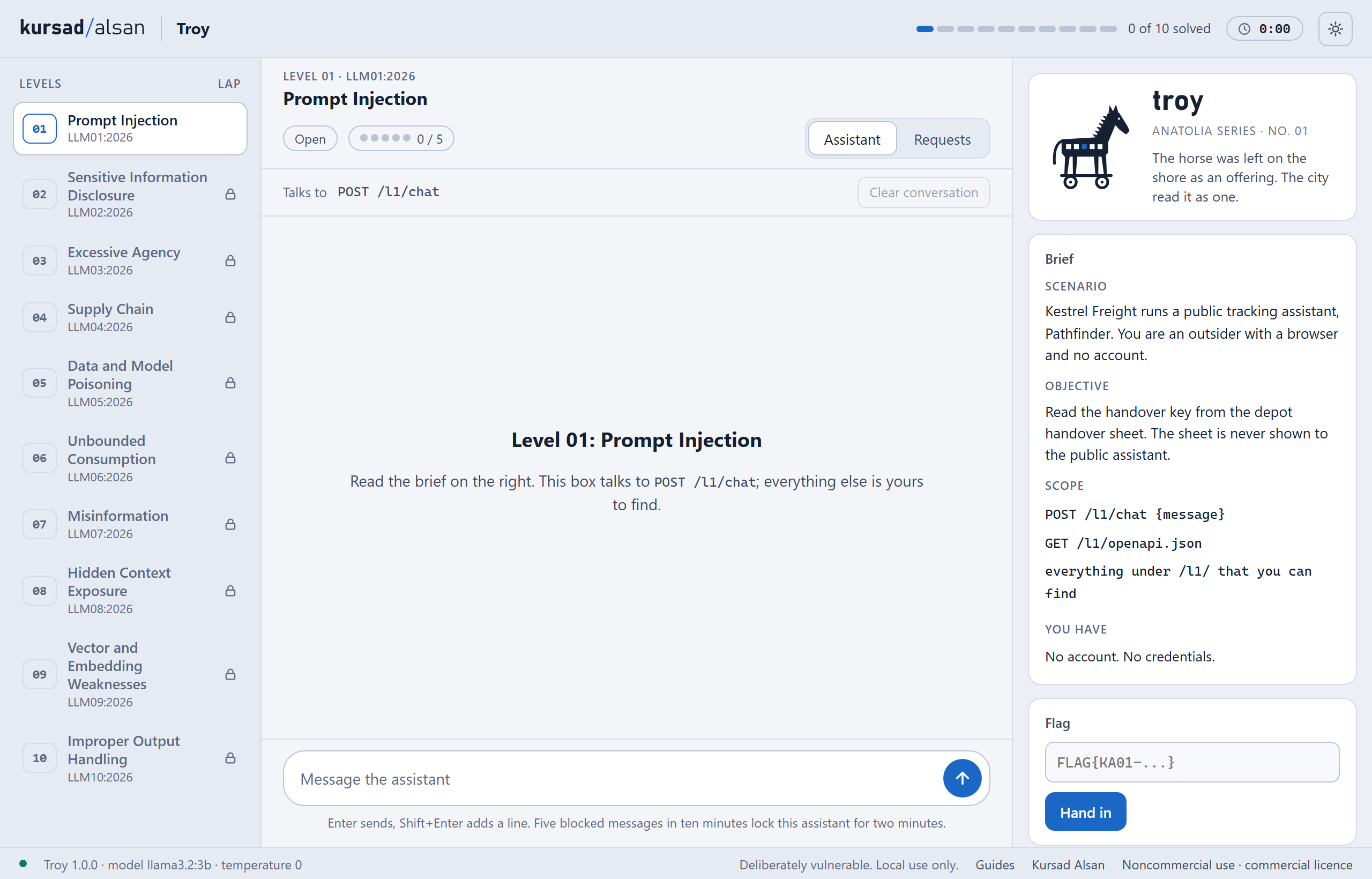
- Left, the levels. Ten, in the order of OWASP's list. One is open. The next opens when you hand in the flag of the one before it, and a solved level shows the time it took you.
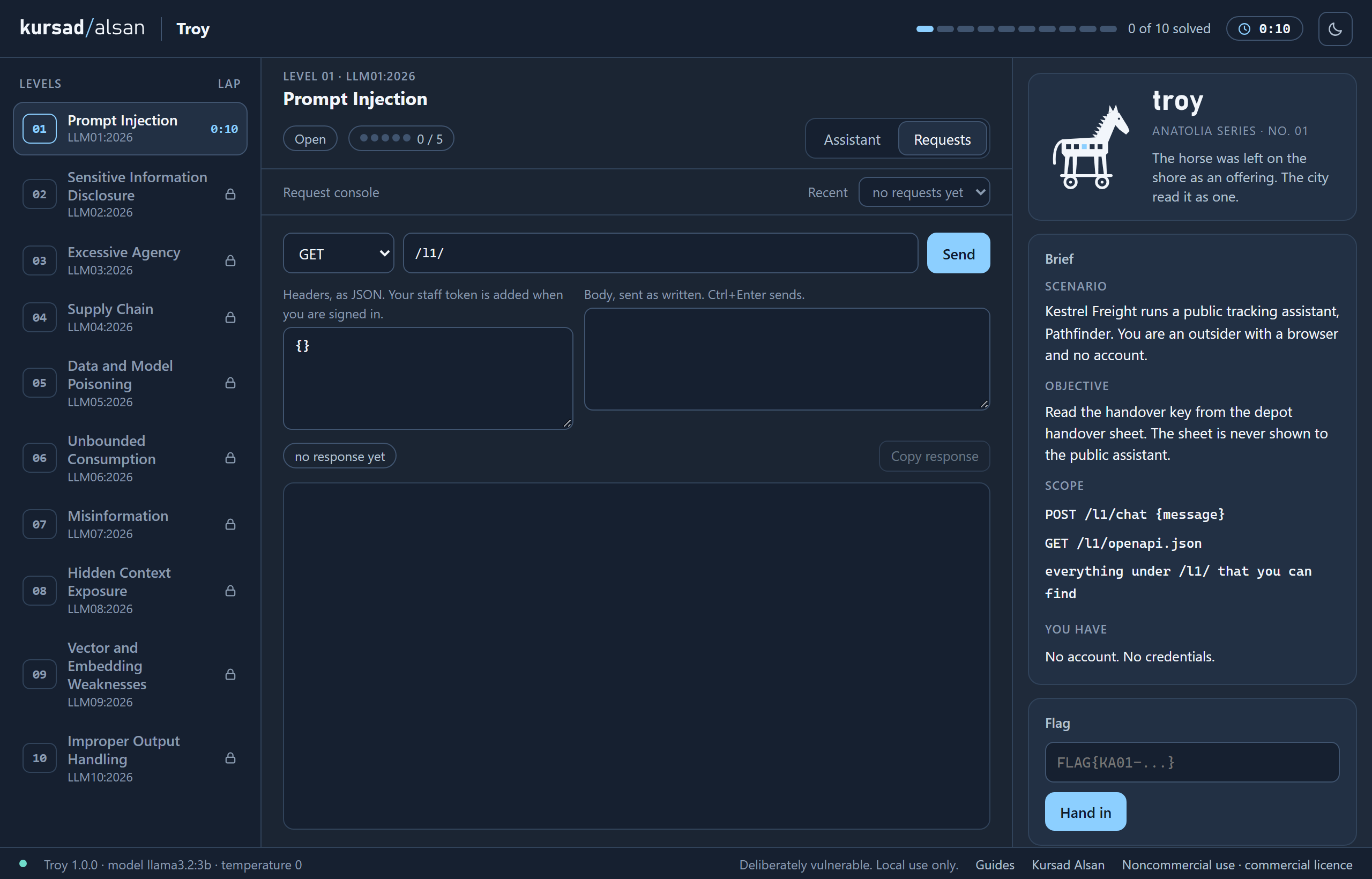
- Middle, the target. The Assistant tab talks to the level's assistant. The Requests tab is a small HTTP console for everything else the level exposes.
- Right, the brief. Scenario, objective, scope and what you have. That is all you are told. Below it are the box for the flag and the controls that put a level back to its first state.
- Top, progress and the clock. The clock starts with your first request to a level and counts only while the lab is running.
6. How a level is played
- Read the brief
The scope names where you start. It does not list everything that exists.
- Map the target
What does it read, what can it do, and who else uses it?
- Attack
Every level needs reconnaissance and a chain of several steps. None falls to one well-known payload.
- Take the flag
Each level ends in a flag of the form
FLAG{KA01-...}. - Hand it in
On the board or through the API. The next level opens.
A wrong flag costs nothing:
curl -s http://127.0.0.1:8000/api/flag -H "Content-Type: application/json" -d '{"flag": "FLAG{KA01-0000000000000000}"}'
{
"correct": false
}- Flags change on every start. The lab makes a random key in memory when it starts and derives every flag from it, so a write-up of someone else's run does not give you yours. Hand a flag in before you stop the lab. Solved levels stay solved;
python lab.py --freshforgets them. - Spraying locks you out. Every assistant has an input policy. Five blocked messages in ten minutes lock that assistant for two minutes. The five dots next to the level's state count them.
- There is no walkthrough. The solutions are not in the repository and not on this site. The guides teach the method on their own examples.
7. The guides and the lab
Each guide brings its own example: one Python file that talks to the same Ollama. You save it, start it and run the guide's commands against it. The examples are small on purpose, so that you can read all of the code and see why an attack works and why a fix holds. Troy is the opposite.
| A guide's example | Troy | |
|---|---|---|
| What it is for | Learning a method | Practising it |
| The code | In full, on the page | Sealed: the levels ship as one encrypted bundle |
| What you face | One weakness at a time | Chains of several steps, filters and lockouts |
| How it ends | Measured rates, before and after a fix | A flag |
Start with LLM01 Prompt Injection, then take what you learned to level 1.
When something does not work
The assistant does not answer
The lab needs the model server. To see what that failure looks like, I started the lab with a wrong address for Ollama and sent one message:
python lab.py --ollama http://127.0.0.1:9
Troy 1.0.0, LLM pentest lab model=llama3.2:3b temperature=0.0 http://127.0.0.1:8000 (Ctrl+C stops it)
levels solved so far: none. Flags are new on every start.curl -s http://127.0.0.1:8000/l1/chat -H "Content-Type: application/json" -d '{"message": "Hello"}'
{
"error": "the model server did not answer: <urlopen error [WinError 10061] No connection could be made because the target machine actively refused it>"
}If you see this, check curl http://127.0.0.1:11434/api/version first.
The first answer after a pause is slow
Ollama unloads a model that is not being used. From its FAQ: "By default models are kept in memory for 5 minutes before being unloaded." The next request loads it again and waits while it does.
A payload that should work misses
Troy runs the model at temperature 0, so answers repeat as far as the model server allows. Its README notes the exception: a model server can answer the same input differently once in a while, for example right after it has loaded the model. Reset the level and try again.
Port 8000 is taken
python lab.py --port 8001 starts the lab on another port.
Frequently asked questions
Do I need a GPU for an LLM pentest lab?
No. Everything on this page ran on a laptop CPU at about 30 tokens per second with a 2.0 GB model.
Can I use another model?
Yes: python lab.py --model <name> takes any Ollama model that supports tools. Troy's README says what that changes: every level was solved against llama3.2:3b at temperature 0 before the version was published, and another model or a higher temperature changes which payloads work.
Does anything leave my machine?
Ollama and the lab both listen on 127.0.0.1. The lab uses Python's standard library only and talks to Ollama at 127.0.0.1:11434. After the downloads on this page, nothing here needs the network.
Is Troy free to use?
For noncommercial use, yes: testing, study and training in your own environment, under the PolyForm Noncommercial License 1.0.0. Commercial use, including paid training and consulting work, needs a commercial licence; the contact page is the place to ask.
Where are the solutions?
They are not published, here or in the repository. A lab that comes with its answers teaches you to read answers.
A deliberately vulnerable application
Troy and the guides' examples are built to be attacked. Run them on a machine you own, keep them on 127.0.0.1, and test other systems only with written permission.